
Wavetable soft synths like Serum 2 are widely used by today's producers, but typically come with a set number of wavetables to build patches from. Since the sound or sonic flavour of the loaded wavetable represents the very essence or essential foundation for sound design inside a wavetable synth, crafting your own is a surefire method to giving things your very own spin.
Some soft synths like Serum 2 come with a dedicated wavetable editor, but these can be difficult or challenging to use, and many simply don't offer this as a function at all - enter Waved Studio, the focus of today's guest post!
We think Waved Studio is a great tool for quickly creating and editing fresh wavetables, and we're not alone - the tool has graced the online pages of Music Radar and even our friends Bedroom Producers Blog. What's more, Waved Studio is a free web app, meaning all you have to do is visit the site to begin creating your own wavetables, or WTs.
We'll let the app's creator, Harry, take it from here to give you the inside scoop on this exciting new bit of kit.
Origins
Whilst wavetable synthesis is omnipresent in modern electronic music, creating original source tables can still feel more complicated than using them. Many producers are comfortable selecting and modulating a wavetable inside a synth, yet fewer regularly build their own from scratch. Waved Studio began as an attempt to close that gap without adding another installation, account or heavyweight production environment into the process.
I'm Harry Speight, a producer, engineer and independent developer based in Yorkshire, UK. My background is practical rather than purely academic: I work across recording, sound design and DJing, and most of my software ideas begin with a friction I have encountered making music. In this case, the problem was simple: I wanted a quick, visual way to design original timbres, move between frames and hear the result without breaking the flow of a session.
The Lowdown
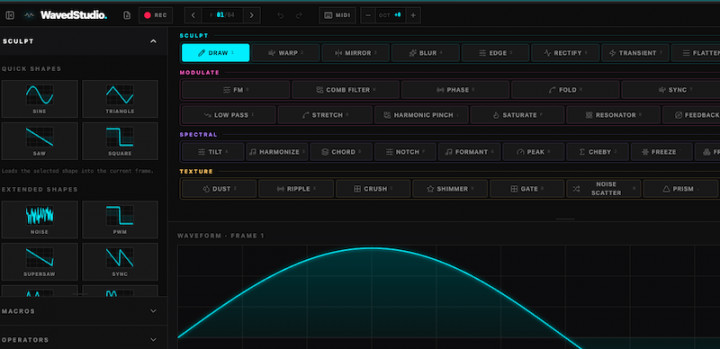
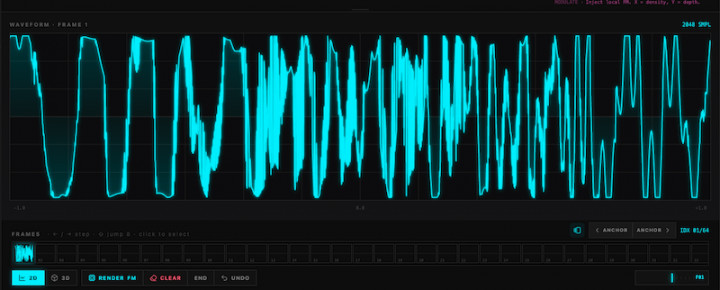
Waved Studio runs directly in a modern browser. The core table contains 64 frames, with 2,048 samples in each. Users can begin with familiar shapes, draw directly onto the waveform, morph between frames or apply local DSP brushes to selected areas. Current tools include smoothing, sharpening, quantisation, downsampling, scattering and stretching, alongside FM, phase-distortion, ring-modulation and amplitude-modulation workflows with live previews.
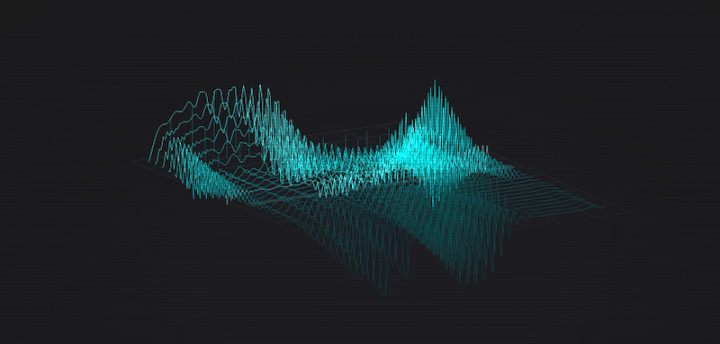
The aim is not to hide synthesis behind a single generate button. A producer can see the waveform changing in two dimensions, inspect the full table as a three-dimensional topology, select ranges of frames and build motion over time. An interactive Motion section adds envelope and filter movement across the table, while browser audio playback, musical typing and opt-in MIDI input let the user treat the editor as an instrument rather than a silent utility.
That visual feedback is especially useful when learning. Wavetable terminology can become abstract very quickly: frames, interpolation, phase, harmonics and modulation are easier to understand when every operation produces an immediate visible and audible result. This makes the tool useful not only for experienced sound designers, but also for producers who have previously relied on factory content because the construction process felt inaccessible.
From Web To DAW
Export is central to the workflow. The free create-to-audition-to-export path is intended to remain intact. Waved Studio currently supports portable WAV, AIFF, WT and H2P exports for downstream use, with workflows aimed at instruments including Vital, Serum and Ableton Wavetable. Compatibility can vary between hosts and formats, so the project is careful not to present every handoff as one-click or fully automatic.
Waved Studio is also an experiment in how specialised music tools can live on the web. Browser software removes the plugin scan, operating-system installer and licensing friction that often stops someone trying a new idea. It also makes tutorials and collaborations easier because the same link can open the working instrument.
The trade-off is that browser audio still requires careful handling around performance, file formats, permissions and host integration. Those constraints have shaped the product rather than being ignored.
Call And Response
The response so far suggests there is an audience for focused browser-native music tools. Waved Studio has been covered by Bedroom Producers Blog and Rekkerd.org, and was included in a MusicRadar feature on increasingly capable browser-based production software. More importantly, producers have begun suggesting real uses: educational walkthroughs, free sound packs, compatibility testing and community wavetable challenges.
The next stage is less about adding features for their own sake and more about proving repeatable creative outcomes. That means clearer tutorials, a small pack of useful tables made inside the editor, stronger compatibility documentation and a more reliable bridge from browser design into everyday production sessions.
For me, Waved Studio sits between music production and product development. It is not an attempt to replace a full DAW or compete with mature synthesizers. It is a dedicated place to explore the raw material that feeds those instruments, with enough visual depth to reward experienced users and enough immediacy to help someone understand wavetable synthesis for the first time.


